

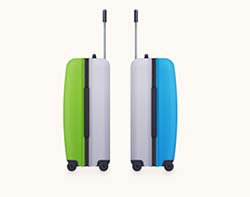
Nel tutorial che andremo a vedere è descritto il processo di creazione di due valigie da viaggio in Illustrator. Per cominciare potrete imparare come impostare una semplice griglia e come creare le principali forme utilizzando strumenti di base e gli effetti insieme ad alcune tecniche di base di costruzione forma vettoriale. Poi, imparerete come aggiungere sottile ombreggiatura e luci per definire l’oggetto.
Related Posts
26
May2013
Create a Delicious Chocolate Text in Illustrator
Per tutti gli amanti del cioccolato, una lezione che mostra come creare un effetto di testo a forma di deliziosa barretta di cioccolato in Illustrator. Si utilizzerà lo strumento Blend,…
25
Oct2013
Create a Bat Scatter Brush in Illustrator
I Pennelli diffusione rappresentano il modo rapido per ottenere più istanze della stessa forma nella vostra illustrazione, e applicare tali forme in modo casuale. Nel tutorial che vedremo viene mostrato…
08
Mar2013
Create a Simple Sea Horse in Adobe Illustrator
In the tutorial you will see is shown how to create a stylized but simple figure of a seahorse, a reference image is used only to have a basic idea…
28
Sep2016

Create a Soccer Text Effect in Illustrator
Nel tutorial che andremo a visitare imparerete come creare un effetto di testo ispirato al mondo del calcio con un campo come sfondo. All’inizio, verrà creato il classico motivo del…
03
Nov2014

Create a Simple Cat Scene in Adobe Illustrator
Quello che andremo a vedere è un bellissimo tutorial in Adobe Illustrator che ci mostra come creare una scena notturna con un gatto che cammina su una palizzata. Un esercizio…
16
Apr2023

Create Gold Editable Text Effect in Illustrator
In this tutorial you will learn how to work with the “Appearance Panel”. Try using the effects: “Gaussian Blur”, “Inner Glow” and “Chrome”. And in just a few minutes, the…






