

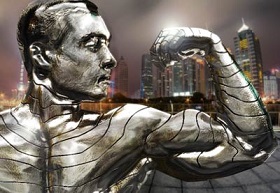
Nel tutorial che andremo a vedere viene mostrato come trasformare la pelle di un soggetto reale di una foto in metallo utilizzando gli strumenti di Adobe Photoshop. Andremo a lavorare sui livelli e gli effetti per avere un personaggio splendente come l’argento.
Related Posts
30
Apr2013
Create a Vintage Photo in Photoshop
Scopri come creare un realistico effetto di invecchiamento per una fotografia con Photoshop utilizzando alcune semplici tecniche. Aggiungendo una vecchia cornice e utilizzando qualche filtro di Photoshop si può, con…
02
Mar2017

I Minions, disegno da colorare
I Minion (parola inglese che letteralmente vuol dire “scagnozzi”) sono gli aiutanti tuttofare di Gru. Il loro principale compito è di seguire e aiutare il loro “boss” nelle sue missioni…
11
Sep2018

Create Retro Pepsi logo animation in After Effects
IIn this interesting video tutorial we will see how to make the animation of the old Pepsi logo using the Adobe After Effects video editing program. A very detailed and…
26
Nov2018

Create a Bouncing Cube Animation in Cinema 4D
In this video tutorial we will see how to create a really fantastic cubic animation using the Maxon Cinema 4D modeling and rendering program. A very detailed lesson that can…
02
Apr2017

Create Liquid Water with Trapcode Mir in After Effects
In this video tutorial we will see a lesson that will teach us how to create a very realistic water or liquid flow by giving it a precise path and…
04
Sep2013
Draw a Leica Camera in Photoshop – Tutorial
Leica è considerata una delle più prestigiose marche di fotocamere. Nel tutorial che vedremo verrà trattato la realizzazione di una delle più importanti fotocamere Leica in Photoshop, il modello M1.…






