

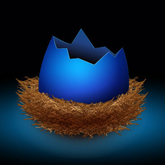
Nel tutorial che vedremo viene mostrato come realizzare in vettoriale un nido di uccello carino con un guscio d’uovo rotto all’interno. Inizieremo disegnando la parte esterna con lo strumento penna, dandogli rilievo con lo strumento Gradiente e ultimandolo con l’aggiunta di ombre e luci. Il tutto poi verrà terminato utilizzando effetti e piccoli trucchi di Illustrator.
Related Posts
10
Jun2013
Create a Glowing Vector Graphic in Illustrator
In the tutorial that we will see, it is shown how to create an abstract drawing with glowing lights in Illustrator. The nice thing about this tutorial is that it…
24
Sep2014

Create Spa Stones and Flowers in Adobe Illustrator
Are you looking for inspiration and inner peace? Do you want to relax and enjoy your day? This tutorial is right for you! The lesson will teach you how to…
13
Nov2014

Creatie a Glowing Hexagonal Texture in Cinema 4D – Tutorial
This video tutorial demonstrates the process of creating a glowing hexagonal brick texture structure within Cinema 4D. A map with which we can coat our 3D objects.
18
Jun2016

Create Shark Logo Design in Adobe Illustrator
In this video tutorial we will see a lesson that shows how to create a logo that has a shark as a symbol with Adobe Illustrator. An exercise that shows…
12
Mar2014

Create a Downloader App Interface in Photoshop
Photoshop è un software fantastico per creare mockup per le applicazioni mobili. I suoi strumenti vettoriali combinati con gli effetti Stile livello, consentono ai progettisti di creare rapidamente layout per…
29
Jan2017

Draw a Lips Logo Design Vector in Illustrator
In this beautiful video tutorial we will see how to draw a sexy and captivating vector logo using the Adobe Illustrator graphics program. We will create a sensual female mouth…










